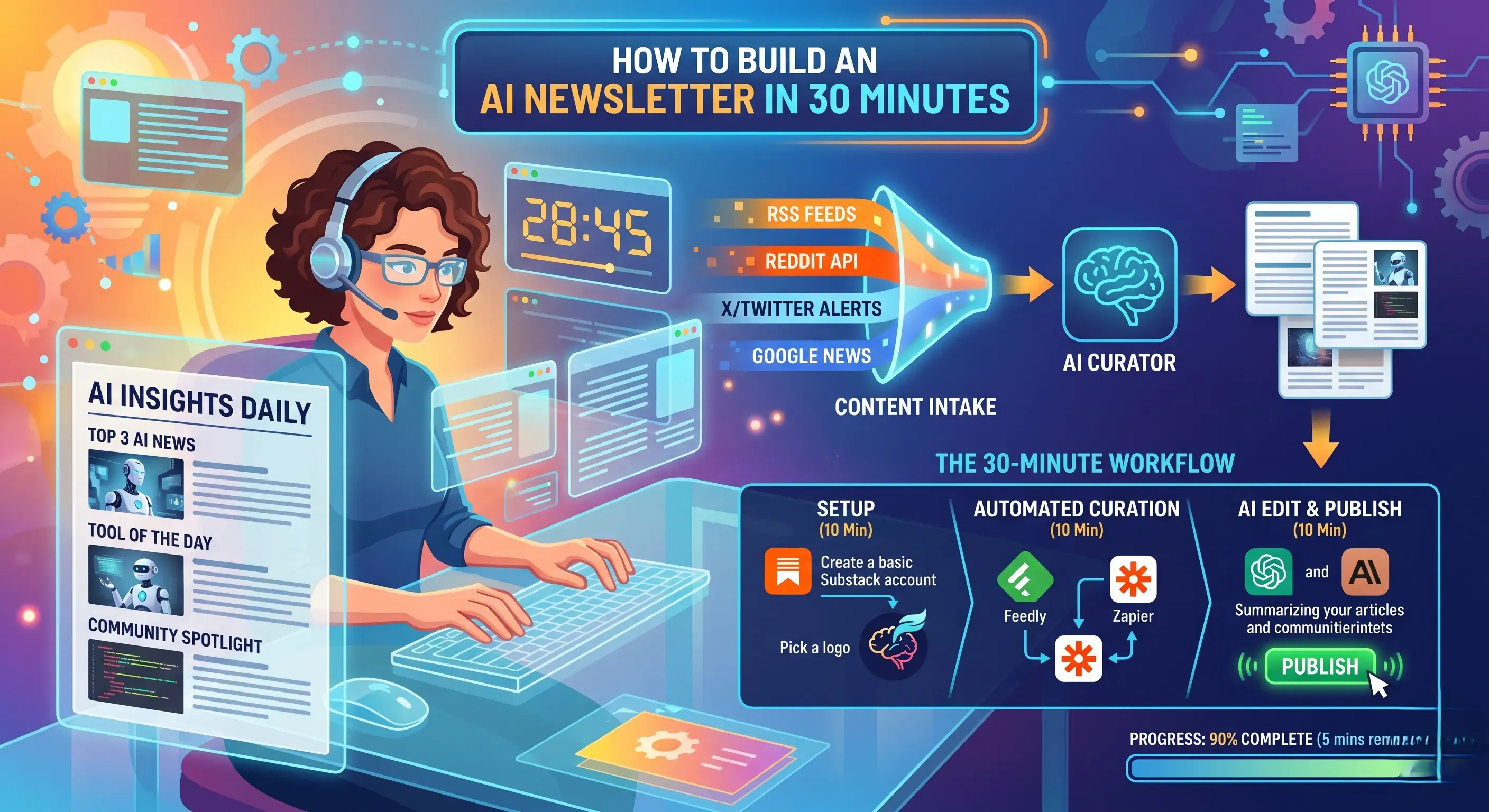
How to Build an AI Newsletter in 30 Minutes
Introduction
Most professionals know they should have a newsletter. They understand the value of a direct communication channel they own, the trust that email builds over time, and the business outcomes a well-run newsletter produces. What stops most of them is the same thing every week: finding the time to actually build and send one.
The average professional receives 121 emails per day, with knowledge workers subscribing to 50 to 100 newsletters. Without automation, email overload costs businesses $12,506 per employee annually in lost productivity.
The irony is that the problem of newsletter creation has largely been solved by the same AI tools that are filling those inboxes. In 2026, building and sending a professional-quality newsletter does not require a copywriter, a designer, a content team, or even a particularly long afternoon. It requires a clear workflow, the right combination of tools, and about 30 minutes of focused work.
Newsletter automation delivers a $36 return for every $1 invested in email automation, representing a 3,600 percent ROI, with 76 percent of teams seeing positive ROI in year one. Zapier
This guide walks you through every step, from choosing your platform and setting up your AI workflow to writing the first issue and hitting send, within a single 30-minute session.
Before You Start: The Five-Minute Strategy Session
Thirty minutes of execution becomes wasted effort without five minutes of strategy first. Before opening any tool, answer these three questions on paper or in a notes app.
Who is this newsletter for? Name a specific, real person who represents your ideal reader. The more precisely you can describe this person, their role, their problems, and what they want to learn, the better your AI tools will perform because you will give them accurate, specific direction.
What will they consistently receive? The ten newsletter formats that work best share one characteristic: each one ties content to a real business job. Trend briefings reduce reaction time. Benchmark reports give context. Case studies transfer operating knowledge. Workflow issues reduce production drag. Curated roundups save time while reinforcing your point of view. Choose one primary format before building anything. A newsletter that tries to be everything to everyone becomes nothing to anyone.
How frequently can you realistically publish? Try keeping newsletters to a regular schedule, such as monthly or weekly, so subscribers know when to expect your next one. Over time, you will build a relationship with your subscribers and increase the impact of your email marketing. A weekly newsletter you actually send beats a daily newsletter you abandon after three issues. Be honest about your capacity before you commit publicly.
With those three questions answered, you have a positioning statement that guides every subsequent decision: this newsletter helps [specific audience] with [specific value] every [frequency].
Step 1: Choose Your Platform (Minutes 1 to 5)
Your platform is the infrastructure that stores your subscriber list, delivers emails, and provides analytics. Choose this first because every other decision is built on top of it.
A tool is only as useful as the workflow it fits into. The best stacks let writers iterate quickly, designers control rendering, engineers automate delivery, and growth teams measure impact.
For most creators and small businesses building an AI-assisted newsletter from scratch, three platforms cover the full range of needs.
Kit (formerly ConvertKit) is the strongest choice for creators, solopreneurs, and content-focused businesses. It provides a clean writing interface, powerful audience segmentation, visual automation workflows, and a creator-focused landing page builder. The free plan supports up to 10,000 subscribers, making it the easiest entry point for new newsletter builders.
Mailchimp is the most widely recognized option and the right choice for teams that need an all-in-one beginner-friendly platform with built-in AI drafting features, audience tools, and a large template library. Its AI writing assistant generates subject lines and body copy variations directly within the platform, making it one of the most accessible tools for building an AI-powered newsletter workflow without external tools.
Beehiiv is the strongest choice for newsletters intended to grow into a media business. It offers built-in monetization through sponsorships and paid subscriptions, a web-native publishing format that gives newsletters search engine discoverability, and strong analytics including subscriber source tracking and engagement scoring.
Sign up for your chosen platform, verify your email, and connect your domain for sending. This takes two to three minutes on any of these platforms.
Step 2: Set Up Your AI Writing Workflow (Minutes 5 to 12)
This is the step that transforms newsletter creation from a two-hour writing exercise into a 15-minute review and editing session.
Most marketing teams are treating AI as just another writing assistant, missing its real potential to transform how they approach newsletter strategy from start to finish. The problem runs deeper than tool selection. For every hour of creative, strategic momentum work, knowledge workers spend three hours on email, admin, and meetings. Some are using purely AI newsletter generators and compromising quality due to poor workflows. Medium
The difference between AI that produces a newsletter you are proud to send and AI that produces generic filler is the quality and specificity of your prompt. Here is the master prompt structure that produces usable first drafts consistently:
"You are writing a newsletter called [newsletter name] for [specific audience description]. The newsletter's purpose is [value statement]. The tone is [describe tone: practical, warm, analytical, conversational]. This issue should cover [topic or theme]. The structure should include: [list your standard sections]. Each section should be [length guideline]. Do not include placeholders. Write the complete issue."
Before writing that prompt, gather your source material. This is where you make the AI's output genuinely valuable rather than generic. Feed it specific inputs:
A key piece of recent industry news or research relevant to your topic. A specific insight, observation, or data point from your own work. Two or three links to relevant external resources you want to reference. Any specific call to action you want to include.
Brand memory matters. Centralize style guides and examples so AI learns your voice. Export paths should prefer tools with connectors or API access to avoid manual copy-paste. QA gates should require compatibility and link validation before any send.
Paste your master prompt with all inputs into Claude or ChatGPT. The output is your working first draft. This process takes three to five minutes once your prompt is built.
Step 3: Write Your Subject Line With AI (Minutes 12 to 15)
Your subject line determines whether your newsletter gets opened or ignored. It is the single highest-leverage piece of copy in the entire issue.
If you are sending out newsletters via email, a compelling subject line will ensure that it gets opened and read. An email subject line merely stating February 5th lacks engagement and specificity. A more compelling choice like February Team News: Updates Inside not only captures attention but also sets clear expectations. You can copy and paste your subject line into your favorite AI platform and ask it if it is a good newsletter subject line.
Ask your AI tool to generate five to eight subject line variations for the issue you just drafted. Give it guidance on format: specify whether you want questions, bold statements, number-led lines, or curiosity-gap structures. Then filter the options against three criteria. Does it accurately represent the issue content? Would a reader recognize it as being from your specific newsletter? Is it specific enough to feel genuinely valuable rather than clickbait?
Preview text, the line that appears in the inbox after the subject line, deserves equal attention. Ask your AI to generate three preview text options that extend the subject line rather than repeat it. Preview text and subject line working together produce measurably higher open rates than either alone.
Create a 3-section promotional newsletter with subject line variants of 35 to 45 characters each. Include a primary CTA and three subject line variants ensuring accessibility alt text for any images generated.
Step 4: Edit, Humanize, and Add Your Voice (Minutes 15 to 22)
This is the step most tutorials skip, and it is the step that determines whether your newsletter builds a loyal audience or gets unsubscribed.
AI produces technically correct, logically organized drafts. It does not produce your specific observations, your direct experience with the topics you cover, or the perspective that only you can provide based on your years working in your field.
The most successful AI-powered newsletter programs share a common characteristic: they enhance human collaboration rather than replacing it. AI should support research synthesis, draft generation, pattern extraction, and formatting. It should not replace editorial judgment.
In your editing session, do four things specifically.
Add one original observation that only you could contribute. This might be a specific experience from your work this week, a counterintuitive take on the news you referenced, or a connection between two ideas that the AI draft missed. This is what makes your newsletter worth subscribing to rather than just following a news feed.
Verify every specific claim. Data and privacy considerations require verifying GDPR and SOC 2 compliance for any tool handling personal information. QA gates should require compatibility and link validation before any send. AI tools hallucinate statistics and misattribute quotes. Check every number and every source before they go to your subscribers. Cometly
Match your voice. Read the draft out loud. Any sentence that you would not actually say should be rewritten. Your subscribers subscribed to you, not to generic AI output.
Add a genuine personal opening. Two to three sentences about what you are thinking about this week, what problem you are working on, or what prompted this issue. This human context is what makes email newsletters feel like messages from a person rather than content delivered by a system.
This editing pass takes six to eight minutes when you approach it as refinement rather than rewriting.
Step 5: Design Your Template Once (Minutes 22 to 27)
You only need to design your newsletter template once. After that initial setup, every future issue inherits the same professional structure.
Most email platforms provide AI-generated layouts that eliminate the need for design expertise. No design expertise is required. ClickUp provides templates and AI-generated layouts to ensure newsletters look professional and polished. In your email platform, choose or customize a template with these elements:
A simple header with your newsletter name and potentially a one-line description of what it covers. Your primary content sections with consistent heading styles. A footer that includes your name, a brief bio or tagline, an unsubscribe link, and any legal requirements for your jurisdiction.
For most text-focused newsletters, simpler design consistently outperforms elaborate graphic design. Readers open newsletters to read, not to look at design elements. High-contrast text on a clean background, generous whitespace between sections, and a single consistent accent color are enough for a professional appearance.
Import your edited AI draft into the template. Review the formatting. Fix any paragraph breaks, heading styles, or spacing that did not transfer correctly from your writing environment.
Step 6: Final Quality Check and Schedule (Minutes 27 to 30)
The final three minutes cover the quality checks that prevent embarrassing mistakes from reaching your subscribers.
Ignoring rendering checks is a common mistake. An email that looks great in the editor can fail in Outlook. Emails break in certain clients. Use a final gate to catch rendering issues before sending. Metrics should track opens, clicks, conversions, and rendering failures so you fix templates, not just copy. Cometly
Send yourself a test email and check it in at least two contexts: your primary email client and your mobile device. Look specifically for broken formatting, images that did not load, links that do not work, and any text that became garbled in the transfer from your writing environment to the email editor.
Check every link manually. Click through each one and confirm it resolves to the intended destination. A newsletter full of broken links damages credibility that takes significant time to rebuild.
Read the subject line one more time in the test email's inbox view. Subject lines often look different in the inbox than they do in the editor. Truncation, punctuation choices, and emoji rendering all look different in an actual inbox preview.
Once your test passes all three checks, schedule your send. If your platform has AI-powered send time optimization, use it. If not, default to Tuesday or Wednesday morning between 9 AM and 11 AM for your initial sends, as these windows consistently produce the highest open rates across most professional audiences.
Automating Your Content Research: The Time Multiplier
Once your 30-minute build workflow is established, the next layer of efficiency comes from automating the content research that feeds your prompts.
AI digest consolidation tools like Readless and Superhuman reduce 35-plus newsletters into one daily summary with 80 to 90 percent time savings. This workflow automation saves 5 to 10 hours per week automating repetitive tasks between apps and eliminates manual copy-paste between tools.
Build an AI agent that automatically summarizes all your newsletters using Make.com and OpenAI. By the end of this process you will have your own AI newsletter summarization agent that gives you the competitive intelligence advantage of staying ahead of trends in your space without spending hours reading.
Zapier connects 7,000-plus apps with AI orchestration including ChatGPT and Claude integration. Make.com offers a visual scenario builder with AI integration across OpenAI, Claude, Mistral, and Gemini with RSS feed integration, database connections to Google Sheets and Airtable, and no-code builders. n8n provides an open-source self-hosted option for data privacy with 1,000-plus app integrations. Zapier
A practical content research automation for most newsletter builders works as follows. Connect your industry's top RSS feeds and newsletter sources to Make.com or Zapier. Set an automation that runs weekly, collects the week's content, passes it through an AI summarization step that filters for items relevant to your specific niche, and delivers a curated briefing document to your notes app or email. This briefing becomes the source material you paste into your master writing prompt each week.
Automate your AI newsletter creation and delivery using a ready-to-deploy n8n workflow template powered by GPT and integrated with Gmail. This workflow generates rich, structured, and engaging AI-focused newsletters automatically formatted into newsletter sections including headlines, tools, stats, and tips.
With a content research automation in place, your weekly process reduces to reviewing the automated briefing, selecting the most relevant items for this week's issue, and running your master prompt with those specific inputs. The 30-minute process becomes 15 minutes.
The AI Newsletter Stack for Different Types of Creators
The specific tool combination you use depends on your newsletter type and technical comfort level.
For the solo creator or individual professional who needs the simplest possible workflow, the combination of ChatGPT or Claude for writing plus Kit for sending covers everything needed. This stack requires no technical setup beyond the email platform account, produces professional-quality newsletters, and costs between $0 and $40 per month depending on your subscriber count and AI plan.
For the content marketer or brand building a business newsletter, adding Surfer SEO for topic research, a Zapier automation for content research, and Canva for simple graphics creates a more robust system that supports consistent quality at higher publication frequency.
For commerce newsletters, Klaviyo's AI-driven product recommendations and predictive segmentation are hard to beat. It pairs well with creative tools by handling the data-heavy personalization and triggering. The workflow is to design creatives in a creative tool, export product blocks to Klaviyo via the connector, and let Klaviyo fill live product feeds. Cometly
For the technical user or team building a heavily automated newsletter, n8n or Make.com connecting RSS feeds, AI summarization, and automated Gmail or email platform sending through a custom workflow represents the most powerful and cost-efficient option. The n8n template that generates and sends AI newsletters automatically using GPT and Gmail is free to use and requires only connecting an OpenAI API key and Gmail credentials.
What to Measure After Your First Send
Measure what matches the format. A trend report should be judged differently from a case study issue. A workflow newsletter may drive replies, saves, and internal sharing. A visibility report may drive content production decisions. Not every valuable newsletter earns the same kind of click.
After your first issue, track four metrics. Open rate tells you whether your subject line and sender reputation are working. Click-through rate tells you whether the content inside the email is generating genuine interest. Reply rate is the most undervalued metric: direct replies from subscribers are the clearest signal of audience engagement and the fastest path to understanding what your readers want more of. Unsubscribe rate tells you whether your content is matching the expectations you set when subscribers signed up.
AI generators get smarter over time by tracking open rates, click-throughs, and other engagement metrics to optimize content selection and increase the impact of your newsletter. All you have to do is review the generated draft, make any needed tweaks, and schedule your newsletter for delivery.
Review these four metrics after each of your first four issues. Look for patterns rather than reacting to individual data points. After four issues, you will have enough data to identify what topics generate higher open rates, which content formats produce more clicks, and whether your publishing frequency matches your audience's appetite.
Conclusion
A newsletter is one of the few marketing assets that compounds in value over time. Each issue builds trust. Each issue demonstrates your expertise. Each issue gives your audience a reason to keep you in their inbox rather than cleaning you out during the next subscription purge.
What works is consistency. Use the same content structure over time so the newsletter becomes a trendline, not a one-off. Also distribute with discoverability in mind. If a newsletter issue contains durable analysis, publish it in a format that can be indexed, shared, and referenced later. The inbox is only one endpoint.
The 30-minute workflow covered in this guide is not a shortcut. It is a sustainable production system that removes the time friction that stops most newsletters from ever getting started or from being maintained long enough to build an audience. The five-minute strategy session, the AI writing workflow, the subject line process, the human editing pass, the template setup, and the quality check each serve a specific purpose in producing something your audience will actually want to read.
Build your template once. Refine your master prompt over the first four issues. Add content research automation once the manual workflow feels effortless. And publish on schedule, every time, regardless of whether the issue feels perfect. The newsletters that build loyal audiences are not necessarily the most brilliantly written. They are the most consistently delivered.