API Basics Every Non-Developer Marketer Should Know
Introduction
You do not need to write a single line of code to benefit from understanding APIs. But if you have been nodding along in meetings when developers mention endpoints, webhooks, and API keys without actually knowing what any of it means, you are making decisions with incomplete information. And in 2026, that gap is costing marketers real money and real opportunities.
APIs are the infrastructure behind almost everything your marketing stack does. When your CRM syncs with your email platform, that is an API. When a new lead from your website form appears in your HubSpot account within seconds, that is an API. When your Google Ads data flows into your reporting dashboard automatically without anyone copying and pasting, that is an API.
APIs are essential for automating marketing workflows and enhancing operational efficiency. The demand for robust data capabilities is driving the growth of the API market, and diverse pricing structures now allow companies of all sizes to leverage powerful marketing tools. Marketful
Understanding APIs at a conceptual level, not a coding level, makes you a better marketer. It helps you ask smarter questions, evaluate tools more effectively, communicate with developers more productively, and spot automation opportunities your competitors are missing. This guide covers everything a non-developer marketer needs to know.
What Is an API? The Restaurant Analogy
API stands for Application Programming Interface. That is a mouthful that tells you very little. So here is the analogy that actually makes it click.
APIs are like the waiters of the internet. They take your order, relay it to the kitchen, and bring back exactly what you asked for. Twilio
In a restaurant, you as the customer do not walk into the kitchen and cook your own food. You do not need to know how the kitchen works. You tell the waiter what you want, the waiter communicates that to the kitchen in the kitchen's language, the kitchen prepares it, and the waiter brings the result back to you.
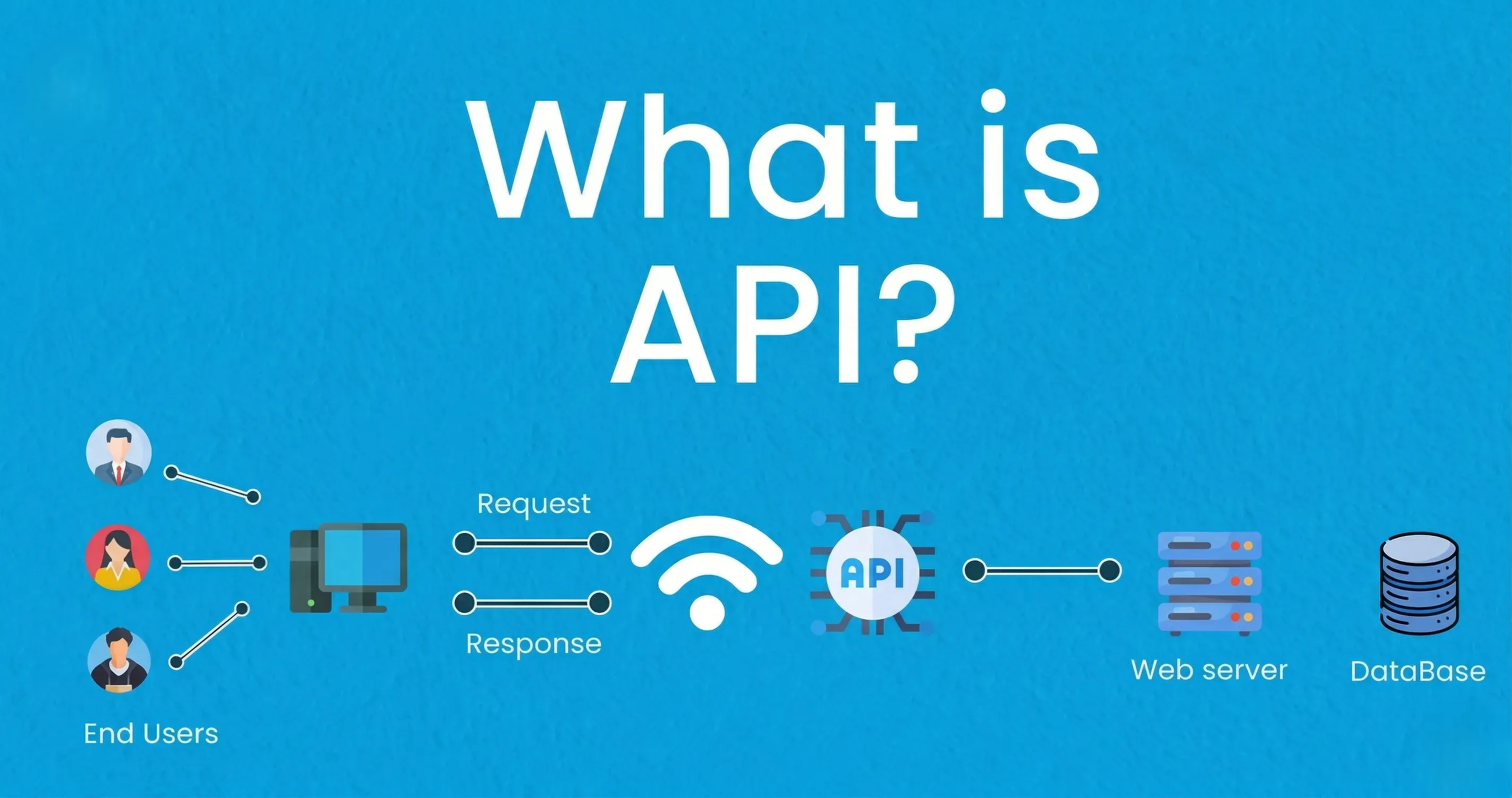
In software, an API is that waiter. When your marketing automation platform needs to create a contact in your CRM, it does not need to understand how the CRM's database is structured internally. It sends a request to the CRM's API. The API understands the request, does the work inside the CRM, and sends back a response confirming that the contact was created.
An application or software can use features or services from other applications, devices, or platforms by following a set of guidelines, specifications, and standards known as an API. This enables the app or program to provide better services. It is essentially a computer program group that permits data transfer between two software programs. Concetto Labs
The key insight for marketers: APIs are what allow your tools to talk to each other. Without APIs, every piece of marketing software would be an isolated island. With APIs, they become a connected ecosystem where data flows automatically and actions in one tool trigger actions in another.
Why Marketers Need to Understand APIs
The Modern Marketing Stack Runs on APIs
Every major marketing platform you use has an API. HubSpot, Salesforce, Mailchimp, Google Analytics 4, Meta Ads Manager, Slack, Typeform, Shopify, Stripe — all of them expose APIs that allow external systems to read data from them, write data to them, and trigger actions within them.
API integrations power processes throughout many high-performing businesses that keep data in sync, enhance productivity, and drive revenue. Very basically, your API integration is the connection between your website and another data source that allows the two to exchange information for the benefit of your website user. Nbh
When you choose a new marketing tool, one of the most important questions to ask is: does this tool have an API, and how robust is it? A tool without an API is a data silo. It cannot send data to your other tools automatically, which means manual exports, manual imports, and hours of work that should not exist.
APIs Enable Automation at Scale
Ad operations automation platforms demonstrate that automated systems can launch approximately 494,000 ads in a 30-day period, saving an estimated 37,087 hours of manual work. That throughput simply is not possible with human clicking. Admanage
That is an extreme example, but the principle applies across every marketing function. The repetitive tasks your team does manually today, exporting leads from a form tool into a CRM, copying campaign data into a spreadsheet, updating contact tags after a purchase, can all be eliminated with API-powered automation. Understanding APIs helps you recognize which of your current manual processes are candidates for automation.
Key API Concepts Every Marketer Should Know
Endpoints
An endpoint is a specific URL address that an API uses to receive requests and return data. Think of it as a specific door in a large building. If the building is your CRM, different doors lead to different rooms: one door for contacts, one door for deals, one door for campaigns.
When a developer says they are calling the HubSpot contacts endpoint, they mean they are sending a request to the specific URL that HubSpot set aside for reading or writing contact data.
For marketers, the practical takeaway is this: when a tool says it can integrate with another tool via API, what it means is that it knows which endpoints to call on that other tool to exchange the data you need.
API Keys
An API key is essentially a password that proves your application or tool has permission to use another tool's API. When you connect two tools in something like Zapier or n8n, you are usually asked to enter an API key from one of those tools. That key tells the target platform: this request is coming from an authorized source.
Treat API keys like passwords. Do not share them publicly, do not paste them into emails, and do not include them in documents that are not secured. If an API key is compromised, someone else can use it to make requests to your marketing tools on your behalf, potentially accessing or altering customer data.
Authentication and OAuth
Not all API connections use a simple API key. Many modern platforms use OAuth, which is a more secure authorization system. When you connect your Instagram account to a scheduling tool and it opens a Google or Meta login window asking you to grant permissions, that is OAuth in action. You are authorizing one platform to act on behalf of another without sharing your actual password.
Requests and Responses
Every API interaction is a conversation between two systems. One system sends a request. The other system sends back a response. Requests come in four main types that correspond to four different actions.
A GET request asks for data. A POST request creates new data. A PUT or PATCH request updates existing data. A DELETE request removes data. When your email platform creates a new subscriber record in your CRM, it is making a POST request to the CRM's contacts endpoint. When it checks whether that subscriber already exists, it is making a GET request.
JSON: The Language APIs Speak
When an API sends data, it needs to format that data in a way both systems understand. The most common format is JSON, which stands for JavaScript Object Notation. You do not need to write JSON, but you will encounter it if you ever look at what an API is sending or receiving.
JSON looks like this: a contact record might be expressed as name in quotes, colon, value in quotes, with different fields separated by commas and the whole thing wrapped in curly braces. It is structured, readable even to a non-developer, and the universal language of modern web APIs.
Rate Limits
API providers do not let you make unlimited requests. Every API has rate limits, which are caps on how many requests you can make in a given time period. Google Analytics might allow a certain number of requests per day. HubSpot might limit how many contacts you can create per minute.
For marketers, this matters when you are building automations that process large volumes of data. If your workflow tries to create ten thousand contacts at once and hits the API rate limit halfway through, some contacts will not be created and you may not know which ones were missed. Well-designed automation tools handle rate limits gracefully by queuing requests. Poorly designed ones fail silently.
APIs vs. Webhooks: The Distinction That Changes How You Think About Automation
Once you understand APIs, you need to understand webhooks, because marketers encounter both constantly and confuse them regularly.
How an API Works: The Pull Model
APIs are manual. They need to be asked to pull or modify data. A webhook is a specific type of API call. The main difference is that webhooks are event-driven data transfers, while APIs request data regularly. Zapier
Think of an API like repeatedly sending a text message to someone asking "are you free?" every hour. You initiate every interaction. You pull the data when you want it.
How a Webhook Works: The Push Model
While APIs wait for you to ask for information, webhooks cannot wait to tell you what is happening. A webhook is a user-defined HTTP callback triggered automatically when something happens. Twilio
Think of a webhook like your friend texting you the moment they become available rather than waiting for you to ask. The other system sends data to you immediately when an event occurs, without you having to ask for it.
An API is like repeatedly texting your friend to see when they are available for coffee. They may say they are unavailable but you keep checking just in case. A webhook is like your friend texting you when they are actually free to grab coffee. You do not have to keep checking. They will let you know when they are free. SuperTokens
Marketing Examples of Each
A webhook example: when someone fills out a form on your landing page, Typeform immediately sends all the form data to your CRM via a webhook. The moment the submission happens, the webhook fires and the lead appears in your CRM in real time. You did not have to schedule a periodic check for new submissions.
An API example: every morning at 8 AM, your reporting tool makes API calls to Google Analytics, Meta Ads, and your email platform to pull yesterday's performance data and populate your dashboard. You defined when the data gets pulled.
CRM and marketing: webhooks help marketing platforms notify your CRM when a new lead is captured or when customer behavior triggers a specific event. Appy pie Automate
The practical rule: use webhooks when you need something to happen immediately in response to an event. Use API polling when you need to retrieve or update data on a schedule you control.
Public APIs vs. Private APIs: What the Difference Means for Marketers
Public APIs
An open API, often referred to as a public API, is one that has been made available by a company for external users to consume. A company with a public API will have purposely designed their API to expose only a certain amount of services that their product offers, which will be documented online for software developers to make use of. The better an API is designed and documented, the quicker a visiting developer can get up and running and start communicating with another system. Dotdigital
When a marketing platform advertises that it has an API, it typically means a public API. This is what allows third-party tools like Zapier, n8n, and Make to build native integrations with that platform. It is also what allows your developers to build custom integrations for your specific business needs.
Private APIs
Private APIs are used internally within a company, connecting different systems that the company operates. You will not interact with these directly as a marketer, but knowing they exist helps you understand why some data in your internal tools is not available for external integration without custom development work.
How APIs Power Your Marketing Stack
CRM and Email Marketing Integration
When someone fills out a form on your website, an API call creates a contact record in your CRM simultaneously. When that contact's engagement score changes in your email platform, an API call updates the corresponding CRM record. When a sales rep marks a deal as closed-won, an API call can trigger an automated onboarding email sequence. None of this requires manual data entry at any step.
Import new signups to your site in real time: the API has several calls which means new signups are not only added to your CRM but are also added to your email platform as contacts, so they can then be sent an automated welcome. Export contacts' email engagement data: API features numerous calls that can export contacts' key engagement data with your campaigns into your CRM, allowing you to create marketing lists and other actions to improve relevant targeting. Dotdigital
Advertising Platforms
The Meta Ads API is a set of programmatic endpoints that let you talk directly to Meta's advertising platform through code. It is the difference between launching 50 ads manually over a week and launching 1,000 ads in an afternoon. You can generate hundreds or thousands of ads from templates, each with unique creative combinations, targeting parameters, and naming conventions. Admanage
For most marketers, this level of API usage happens through a third-party tool rather than through direct API calls. But understanding that your ad automation platform is using the Meta Ads API under the hood explains why it can do things the native Ads Manager interface cannot.
Analytics and Reporting
The Insights API lets you pull exactly the metrics you need, formatted how you need them, feeding into custom dashboards built for your specific business questions. Want to see how Meta ad performance correlates with email campaign sends? Pull both datasets into your system and visualize the relationship. Need to report advertising performance alongside sales data for board presentations? Combine Meta insights with your CRM data in a unified view. The API makes Meta advertising data just another data source in your analytics stack. AdStellar
The No-Code API Revolution for Marketers
You do not need a developer to use APIs in 2026. A generation of no-code tools has made API-powered automation accessible to anyone willing to invest a few hours in learning.
Zapier allows you to connect over 7,000 apps using their pre-built API integrations with a visual interface. n8n provides the same capability with more control and a self-hosting option. Make, formerly Integromat, offers visual workflow building that connects APIs across your entire stack. Webhooks by Zapier lets you connect any app you want, and it is completely no-code. Zapier
These tools work by handling the technical API calls on your behalf. You define what should happen, when it should happen, and what data should flow between systems. The tool makes the actual API requests. You get the power of API integration without writing any code.
API Concepts That Come Up in Marketing Conversations
API Documentation
Every public API comes with documentation that describes every available endpoint, what data each one accepts, what it returns, and how to authenticate. When a developer asks "do you have API docs for that tool?" they are asking where to find this reference guide. As a marketer, knowing that API documentation exists and knowing how to find it on a vendor's website is a useful skill even if you cannot read it fluently.
API Versioning
APIs change over time as platforms add features or deprecate old ones. Facebook updates the API version roughly quarterly, with two major versions each year and occasional out-of-cycle updates. Meta guarantees support for each version for at least 2 years from release, but deprecated features will eventually stop working. Building update checks into your automation prevents nasty surprises. Admanage
When your developer or automation tool tells you that an integration stopped working because of an API version change, this is what they mean. The endpoint you were calling no longer works the same way it did when the integration was built.
Sandbox Environments
Many APIs offer a sandbox or testing environment where you can make API calls without affecting real data. Use a test ad account or minimal budget when first running API scripts. Mistakes in code like accidentally creating hundreds of campaigns in a loop can spend real money fast. Create a campaign with a small budget and pause it immediately to test your create and edit flows safely. Admanage
For marketers building automations, always test in a sandbox or with a small test segment before running any API-powered workflow against your full live data.
Questions to Ask Your Developer When APIs Are Involved
When your team is evaluating a new integration or building a custom connection, these are the questions that will make you sound informed and get the conversation moving in the right direction.
Does this platform have a public API? What data can we read from it and what can we write to it? Are there any rate limits we need to design around? How are API keys managed and rotated? Is there a webhook option for real-time events or do we need to poll? What happens when the integration fails? Is there error handling and alerting?
You do not need to know the answers. You need to know to ask the questions.
Conclusion: API Literacy Is a Marketing Superpower
You now know what an API is, how it works, the difference between an API and a webhook, how authentication and API keys work, what rate limits are, and how APIs power the marketing tools you use every day. You understand the no-code tools that put API power in non-developer hands and you know the questions to ask when integrations are being discussed.
By knowing how to integrate APIs, or knowing enough to hire someone who does, you will be ahead of the game when it comes to marketing. API integrations power processes throughout many high-performing businesses that keep data in sync, enhance productivity, and drive revenue. Nbh
You do not need to write code. But you do need to understand the infrastructure well enough to recognize opportunities, evaluate tools intelligently, and collaborate with technical teammates effectively. That is what API literacy gives you. And in a marketing landscape where automation, integration, and data flow separate high-performing teams from average ones, it is a skill that pays dividends every day.